.svg)


Feasibility is only valuable if it leads to a clear decision. Teams need to test design options with confidence and finish with information that clearly communicates what works, what doesn’t, and why. When results are hard to share or inconsistent from project to project, go or no-go decisions slow down.
This release focuses on the final step of feasibility. With custom report templates connected to live models, teams can turn analysis into clear, standardized, decision-ready reports without manual rework.
Reports Updates
Create Custom Report Templates
In the last release, you were able to generate reports from a blank template or an out-of-the-box 3-page report template. Now you can create and save custom report templates for your entire team.
Add your company logo and imagery, set sheet sizes and orientations, and apply different sites and schemes across report pages. This gives your team a standardized, branded report layout—without needing to rebuild it for every deal.
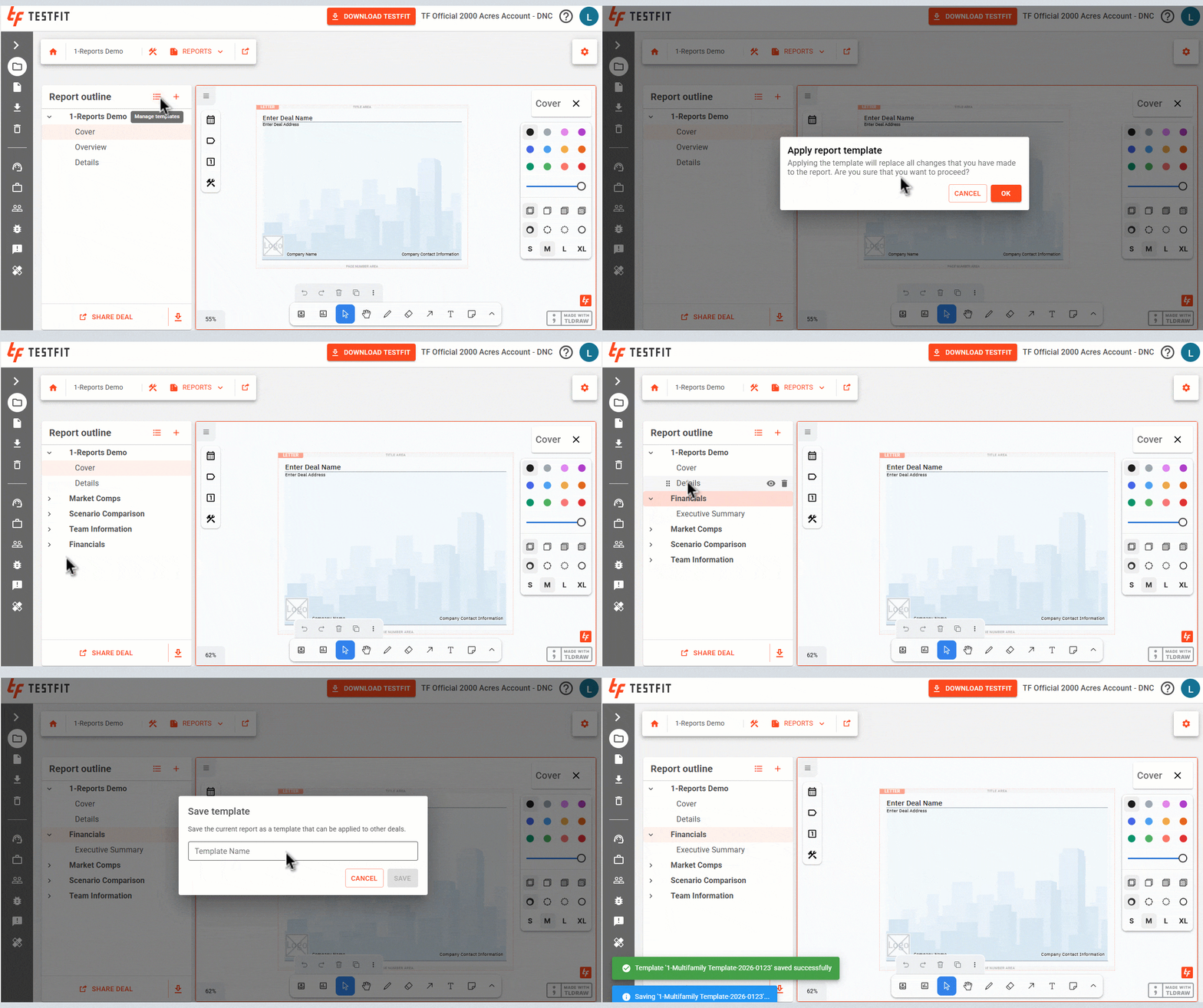
Because templates stay connected to live TestFit models, your reports automatically pull in up-to-date visuals and data. As designs change, your reports stay current, helping you communicate feasibility outcomes clearly without manual rework.
From Analysis to Decisions
With custom report templates, this release makes it easier to communicate feasibility outcomes with clarity and consistency. By keeping reports connected to live models and standardized across teams, you can reduce back-and-forth, speed up reviews, and support faster, more confident go or no-go decisions.